 Johnattan's Laboratory
A one-click Mac meeting recorder that transcribes on the laptop
I wanted to record both sides of any online meeting with one click and get a transcript without the audio leaving my Mac. So I built MeetRec, a menu-bar recorder with offline transcription in Spanish and English.
Updated15 Oct 2026
The problem
What I wanted was "something in SwiftBar that I can just click and make sure I'm recording": the other people in a Zoom, Teams or Meet call, or anything else the Mac plays, plus my own microphone. Then I wanted transcripts of those recordings made on the laptop itself, for meetings in Spanish, in English, and sometimes both at once.
What I built
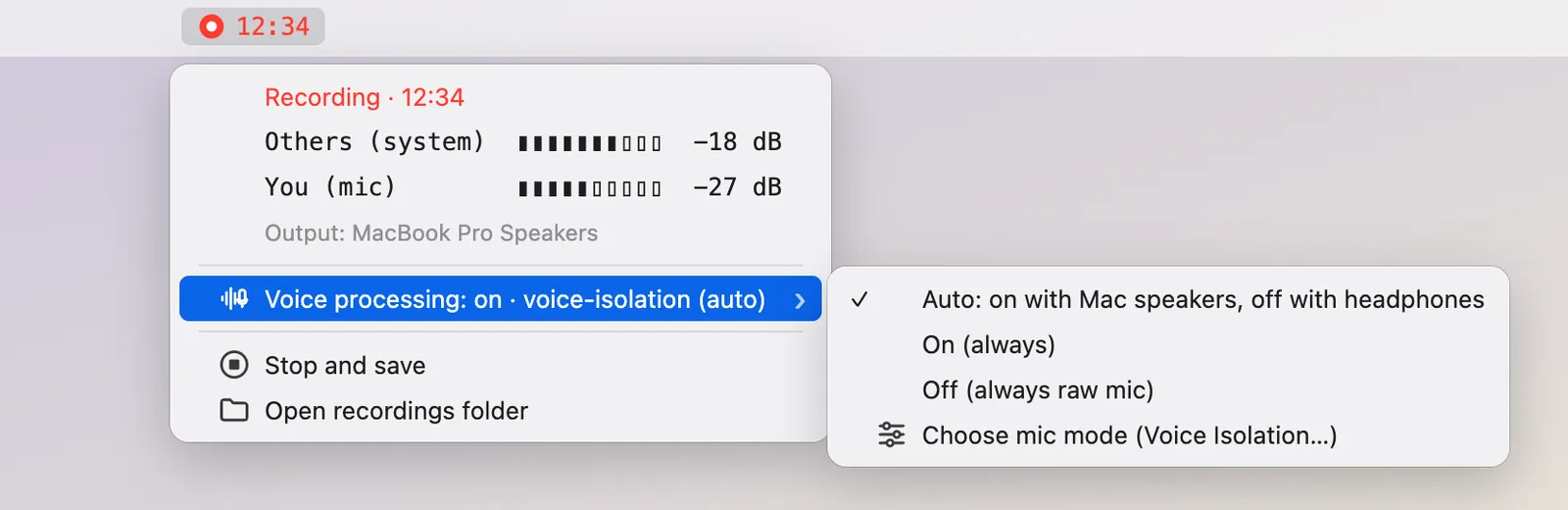
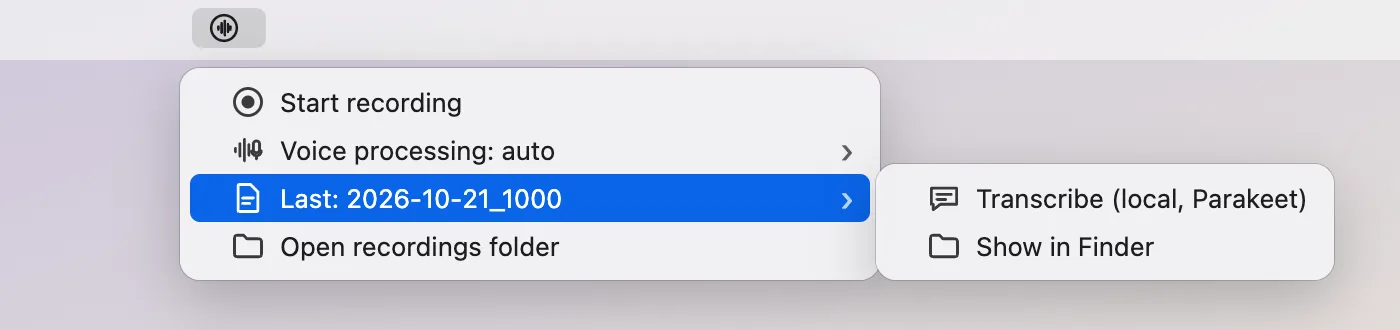
MeetRec is a background app with a waveform icon in the menu bar. Click Start recording and the menu bar shows a grey "Starting…" until audio actually reaches the disk, then a red timer. Open the menu while recording and you see live level bars for the other side and for your microphone, so you can confirm both are coming in. A warning sign appears if a source fails, stalls or cannot write.
Stop and save writes three files: the mixed meeting, your microphone alone, and the system audio alone. Keeping the two sides apart makes transcription easy, because you know which track is you.
Transcribe runs Parakeet TDT 0.6b v3 on the Mac's Neural Engine through FluidAudio and writes a transcript with each line labelled by track. The models (about 0.6 GB) were downloaded once; after that nothing leaves the Mac. If you were on speakers, the microphone also hears the other side, so words that repeat the other track at the same moment are removed, but only when the audio shows a real echo. Removed words are listed at the end of the transcript.
The README also reminds you that recording people may need their consent, depending on where you are, and to announce it.
Equipment
- Swift Code and infrastructure
- SwiftBar Apps and services
- FFmpeg Code and infrastructure
- FluidAudio Code and infrastructure
- Parakeet AI models
- Claude Code Harnesses and agents
- Claude (Opus 4.6 to 5.5) AI models
- Codex CLI Harnesses and agents
- GPT (GPT-5.5 to GPT-6.1 in Codex) AI models
How I built it
- I wrote the recorder in Swift. System audio comes from a Core Audio process tap, so it works whether sound goes to speakers, AirPods or a virtual device, and switching output mid-meeting needs no restart. The microphone uses the current default input, mixed down to mono.
- Every audio buffer is written at the position its timestamp implies, so a dropout becomes silence, clock drift is corrected in small steps, and the two tracks line up exactly. Raw audio goes to crash-safe 16-bit files, and ffmpeg encodes and mixes them at the end. If saving fails, the raw audio is kept and the menu offers Retry save.
- A SwiftBar plugin refreshes every second and draws the timer, the level bars and the warnings. A watchdog rebuilds any source that delivers nothing for 3 s.
- I added the transcriber as a separate Swift package. My first Spanish test was invalid (an English voice reading Spanish text), so I moved to the int8 v2 encoder and a Latin-script language filter, and checked Spanish, English and mixed meetings.
- Codex (GPT-6 Astra, high) reviewed the code independently twice. The first review found 12 defects, including writes that could fail while the timer looked healthy, and an echo filter that could delete a real "No, we should approve it". The second checked the fixes and found 9 more. I addressed all of them except the items now listed in the README as known limits.
- Then I fixed what real use broke: AirPods Max disconnected during a recording, the reused audio engine kept the headset's old 24 kHz format and threw an exception, and the status timer died. Now every microphone start gets a fresh engine with a format check, exceptions are caught, and the status and watchdog run on separate timers.
Results
- Transcribing a one-hour recording took 22 s (340 MB).
- With voice processing on, speaker echo of the meeting in the microphone dropped from a GCC score of 0.137 to 0.006. With Voice Isolation, the background between your words fell about 30 dB (median -59 to -90 dB) while your voice stayed within 5 dB. The catch is that macOS turns other audio down about 5 dB while it is on.
- Taking AirPods Max off: MeetRec follows macOS to the MacBook microphone within about 2 s, with no gap. Putting them back on loses about 5 s of microphone audio while macOS reconnects the headset microphone.
- Tested: output and input switches mid-recording, a recorder crash and hang, reused process IDs, failed saves and double clicks. Not tested yet: a real full disk and real recordings of several hours.
What I learned
Test a language with a speaker of that language. My first Spanish transcription test used an English voice reading Spanish text, so it told me nothing about Spanish meetings.
Devices change all the time in everyday use. Headsets drop and reconnect in the middle of calls, and a recorder that assumes the device stays put will lose audio.
Removing echo is risky because it can remove real speech, which is why I tried an ffmpeg echo canceller and rejected it. Word removal now needs acoustic evidence of an echo, and the removed words stay visible in the transcript.
Lab notes
-
A real Bluetooth headset dropout cost 33 seconds of microphone audio, so I made the recorder survive one mid-recording. I also added an optional voice-processing mode with echo cancellation and Voice Isolation, and measured what it does.
-
Codex reviewed it independently twice. I addressed the 12 findings of the first review and the 9 new ones of the second, except the items I list as known limits.
-
I built the menu-bar recorder (system audio through a Core Audio process tap, the microphone through AVAudioEngine, ffmpeg to encode and mix) and added local transcripts with Parakeet through FluidAudio. My first Spanish test was invalid, so I switched to the int8 v2 encoder and a Latin-script language filter.